![qpbvjgyfsatax1w7v6mw.png]](https://knowledge.junipeer.io/hs-fs/hubfs/qpbvjgyfsatax1w7v6mw.png?width=300&height=91&name=qpbvjgyfsatax1w7v6mw.png)
Articles
Disable new products in Magento *
"Do you want non existing products to be marked as disabled in Magento? We recommend that you enable them manually."
When syncing from an ERP it usually contains incomplete product data and it needs to be enriched before published. We recommend that you disable the new products so that you can enrich the products before publishing it to your customer.
Suggested default setting "Yes"
Price Incl Taxes *
Are prices include taxes/vat in Magento?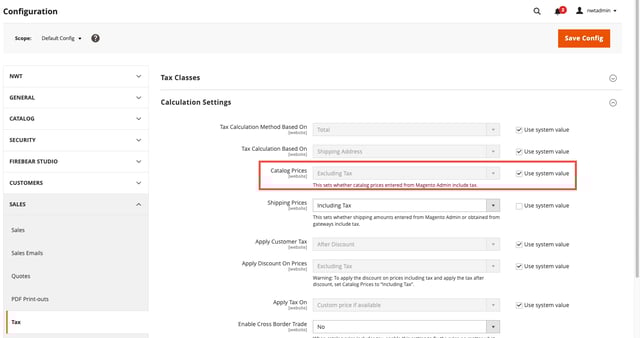 Create
Products *
Do you want to create non existing products in Magento?
Do you want to create new products?
Update products *
Do you want to update already existing products in Magento?
Default Website *
Choose the default Magento Website
Insert screenshot here
Default Attribute Set *
Choose the attribute set that we should add on new Products.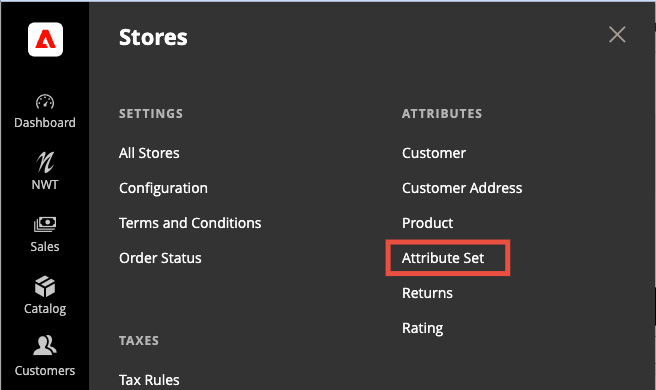
Default Category *
Choose the category that we should add on new Products.
Fields to update *
If you want to update products, choose which fields should be updated.
Customers
Choose the default Customer Group for new customers. May be empty.
Default Company Customer Group
Choose the default COMPANY Customer Group for new customers. May be empty.
Magento Order Status
Do you want to create an invoice in magento when an order is invoiced in Fortnox?
If you manage your orders in Fortnox you want to enable it to Yes. Usually it is easier to managed the orders in Magento and sync invoices in the other way due to the limited order management capabilites of Fortnox.
Do you want to capture the invoice when its created in Magento? When capturing an invoice, a signal will be sent to your payment provider from Magento which process the payment.
Do you want Magento to notify customers when the invoice is created?
Do you want to create an shipment in Magento when an order is invoiced in Fortnox?
Do you want Magento to notify customers when the shipment is created?
Orders
Magento Order Statuses
What should the order status be on an Order in Magento before it is synced? Keep empty if you want all orders to be synced no matter what the status of the order is.
If you want to filter out which order statuses to sync, for example some payment methods has different statuses depending on if the payment was approved or not. Examples of order statuses New, Pending Payment, Processing, Complete, Closed, Canceled, On Hold, Payment Review.
Add VAT on order rows *
Do you want to include VAT on order rows?
Set to Yes.
VAT included in order rows *
Are prices on order rows sent including tax or excluding tax?
Set to Yes.
Magento shipping method attribute
Which attribute should we use to get the shipping code from a magento order?
If you want to map the Magento shipping method to your shipping method in your ERP. You can choose what to map it to.
Map Shipping methods
Map Fortnox and Magento Shipping Methods.
When a bundle product has a fixed price, the price will be set on the bundle item (not children calculated), all children items (simple products) will have price = 0. Should we ignore these items (not adding them to order items)?
Order Default Terms of Payment in Fortnox *
Choose the default terms of payment to use on orders in Fortnox (only if not mapped, see bellow)
Usually the default is set to 30 days or the time from order to payout from payment provider.
Map Fortnox and Magento Payment Methods.
Stock
Set Out Of Stock *
When quantity is 0, do you want to mark the product as out of stock?
If you want to use backorders in Magento. Set this to no, otherwise it's best to set out of stock.