![qpbvjgyfsatax1w7v6mw.png]](https://knowledge.junipeer.io/hs-fs/hubfs/qpbvjgyfsatax1w7v6mw.png?width=300&height=91&name=qpbvjgyfsatax1w7v6mw.png)
1. Create a New Integration
2. Set API Permissions
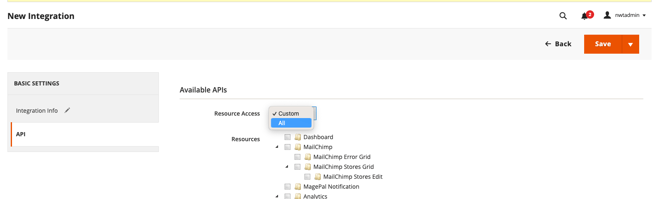
Go to the API tab on the same page.
Select "All" to grant full access (or choose specific resources that the integration should have access to).
3. Save and Activate the Integration
Click "Save" to save your new integration.
After saving, you will see an "Activate" button. Click on it to activate the integration.


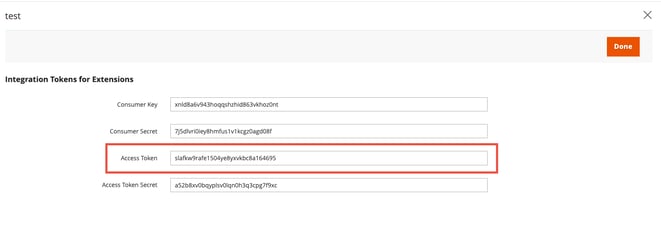
A popup window will appear showing the Consumer Key, Consumer Secret, Access Token, and
Access Token Secret. Make sure to copy the access token since it needs to be used in the Junipeer portal when connecting Magento/Adobe 2.
Log in to the Magento admin panel using your administrator credentials.
Navigate to System > Extensions > Integrations.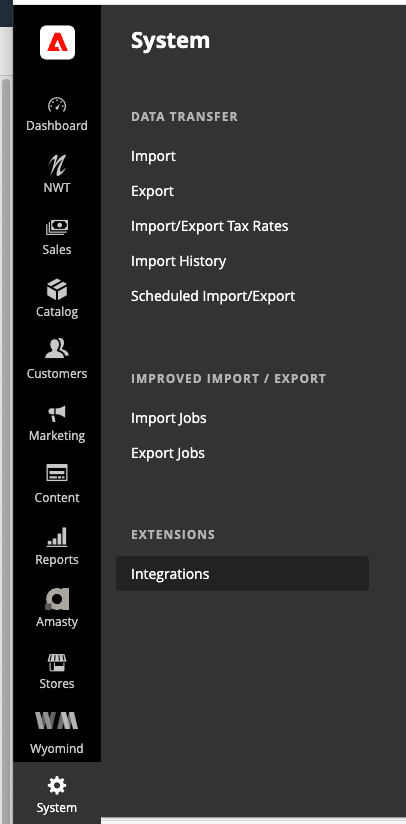
Click on "Add New Integration" to create a new integration.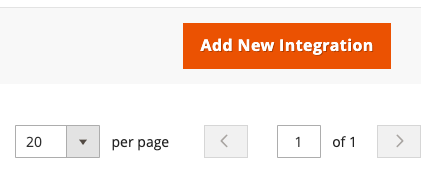
Enter the Name of the integration and your Administrator Password.
You may also enter an email address or a callback URL, but these are optional.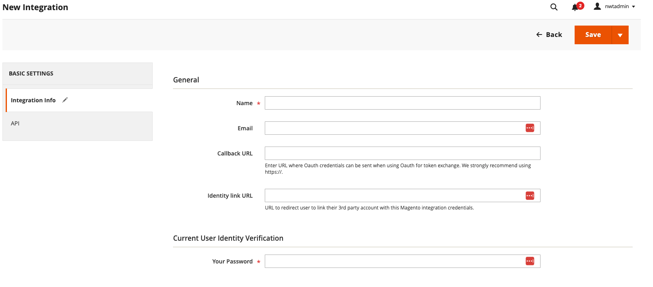
2. Set API Permissions
Go to the API tab on the same page.
Select "All" to grant full access (or choose specific resources that the integration should have access to).
3. Save and Activate the Integration
Click "Save" to save your new integration.
After saving, you will see an "Activate" button. Click on it to activate the integration.
A popup window will appear showing the Consumer Key, Consumer Secret, Access Token, and
Access Token Secret. Make sure to copy the access token since it needs to be used in the Junipeer portal when connecting Magento/Adobe 2.