![qpbvjgyfsatax1w7v6mw.png]](https://knowledge.junipeer.io/hs-fs/hubfs/qpbvjgyfsatax1w7v6mw.png?width=300&height=91&name=qpbvjgyfsatax1w7v6mw.png)
In Junipeer:
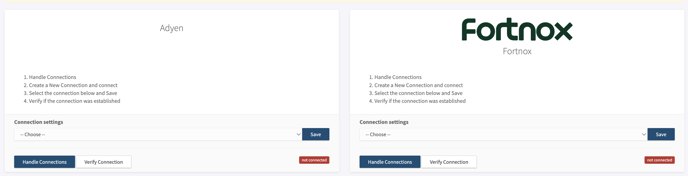
Step 1: Connect your integrations. Click on Handle Connection. For adyen you need to add your CompanyID that you have in adyen, for example "Junipeerioab". For fortnox as an example, you click on Handle Connection and login to your fortnox account to give access.
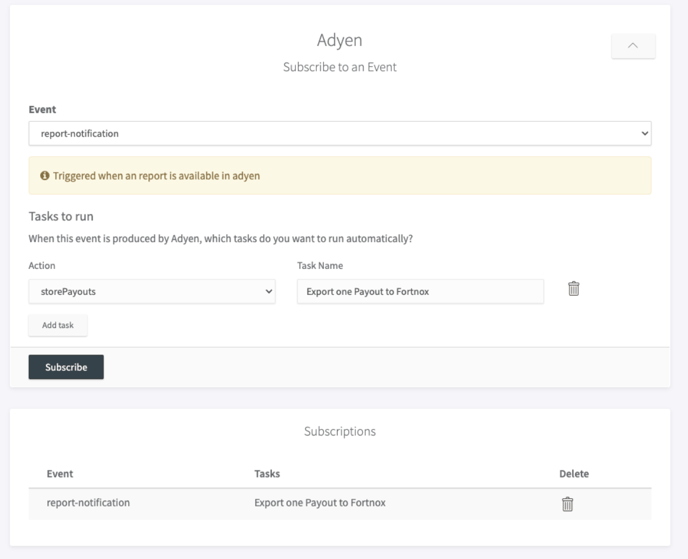
Step 2: Once step 1 is done, it is time to create webhooks.
Click on Webhooks -> Click on the arrow to open the tab. Select event, in this case report-notification
Click on Add Task. A name for the task is automatically created. The name can be changed.
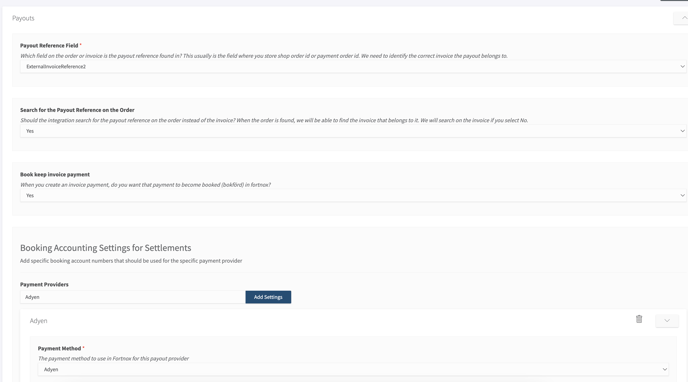
Step 3: Map the fields under Configuration - > Settings and Click on Payouts.
When you have added Adyen as the payment provider you can click on arrow to add your Account numbers.
In Adyen:
Step 1: Login to Adyen Merchant Portal, then go to Reports, in reports overview scroll down and choose "settlements details"
Step 2: In Settlement details you click on Manage Reports, choose Manual (generate once) to create a report. Choose Automatic to generate reports daily. Use .CSV as the file type.
.png?width=688&height=198&name=Screenshot%202024-04-24%20at%2016.15.55%20(1).png)
The image above shows how it looks in adyen when it is sent to Junipeer.
We recommend to set Automatic and send it one a day.